If you use ChatGPT to brainstorm, draft, or edit coursework submitted through Canvas, you have probably wondered: can Canvas detect ChatGPT? With universities worldwide adopting strict generative AI policies, students and educators frequently ask what Canvas LMS actually tracks, whether it monitors your browser tabs, and how professors uncover AI-generated text.
Can Canvas Detect ChatGPT? (The Short Answer)
⚡ Direct Answer
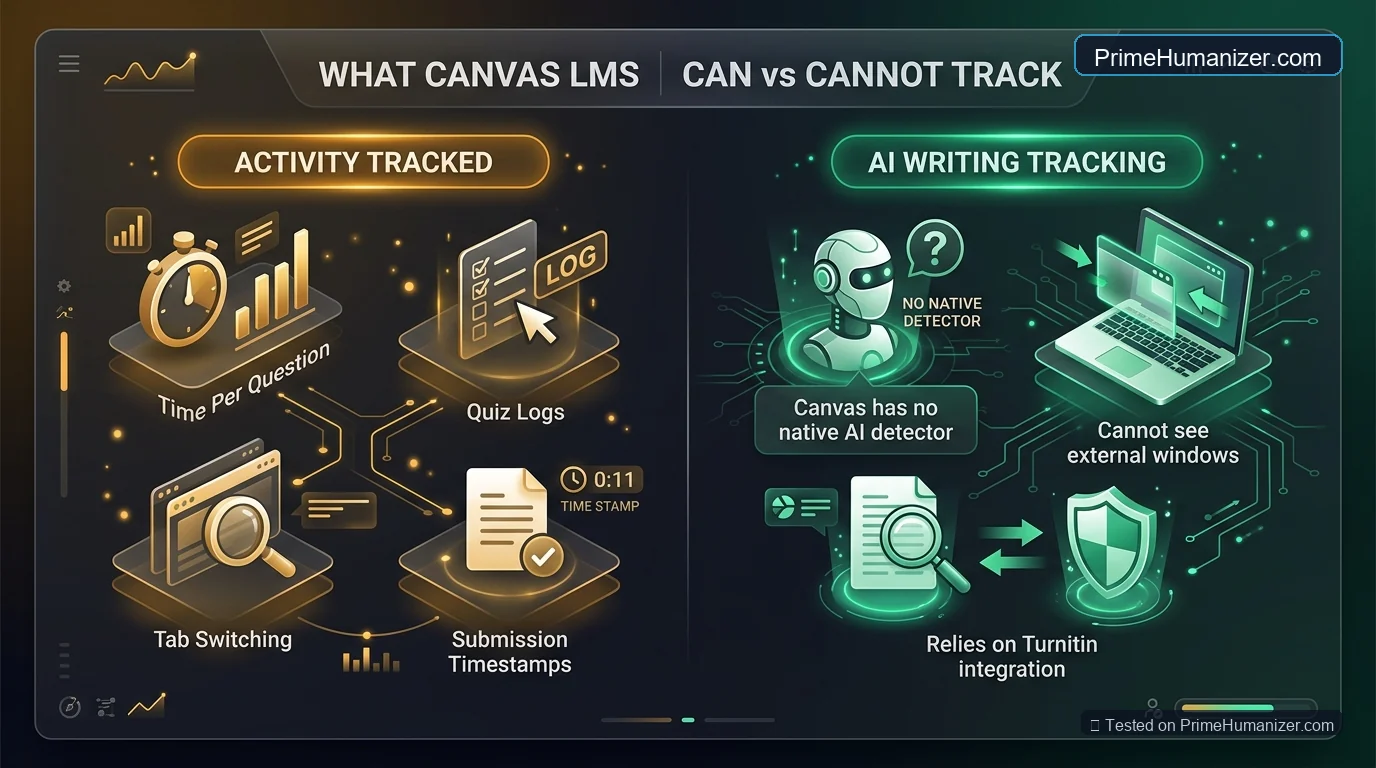
No, Canvas LMS cannot natively detect ChatGPT or AI writing on its own. Canvas has no built-in artificial intelligence detection scanner. However, Canvas can track quiz session activity (such as clicking outside the exam tab), and universities commonly integrate third-party detectors like Turnitin into Canvas assignment submission portals.
In short: Canvas itself does not scan your prose for statistical patterns. But the plugins, proctoring tools, and submission integrations attached to Canvas certainly do. Understanding the boundary between native Canvas tracking and external detection is key to managing your academic workflow responsibly.
What Canvas Actually Tracks (Quiz Logs & Activity Data)
While Canvas does not analyze linguistics, it gathers detailed session metadata during timed assessments and normal browsing:
1. Canvas Quiz Log Audits
During an unproctored Canvas quiz, the system records an action audit log. Instructors can inspect timestamps showing when you started, when you answered each question, and whether you navigated away from the exam page (logged as “Stopped viewing the Canvas quiz” or “Resumed viewing”).
2. Can Canvas Track Copy and Paste?
One of the most common student concerns is whether Canvas tracks copy and paste. In standard assignment text entry boxes, native Canvas does not record keystrokes or clipboard events. However, if your exam utilizes third-party lock-down browsers (such as Respondus Monitor or Proctorio), clipboard access is completely disabled and logged as a violation if attempted.
3. SpeedGrader Submission Metadata
When you upload a Word document or PDF, SpeedGrader provides professors with file metadata, upload timestamps, and submission revisions. If an assignment integrates external detection, the similarity and AI score appears directly next to your grade sheet.
How Professors Actually Catch ChatGPT on Canvas
If Canvas has no native detector, how do educators catch AI-assisted submissions? There are three primary mechanisms:
1. Turnitin LTI Integration Inside Canvas
Nearly all major universities embed Turnitin directly into Canvas assignment folders. When you click “Submit,” your document passes through Turnitin’s neural classifier before reaching your instructor. Learn more about how these institutional filters operate in our guide on how Turnitin AI detection works.
2. Hallmarked AI Linguistic Quirks
Experienced professors do not even need software to spot unedited AI writing. Raw ChatGPT drafts rely heavily on dead giveaways:
- Repetitive transition words like “delve into,” “testament to,” “tapestry,” “crucial,” and “furthermore.”
- Uniform sentence lengths with zero rhythmic variety (low burstiness).
- Flawless grammar devoid of personal opinion, course lecture references, or unique voice.
- Fabricated or hallucinated academic citations.
To eliminate these statistical markers during drafting, check out our tested prompt frameworks on how to prompt AI to write like a human.
3. Google Docs Version History Inspection
If professors suspect an essay was generated by AI, they may ask students to share the Google Docs editing link. A genuine 1,500-word human essay displays hours of typing, backspacing, and revisions. A pasted AI document shows 1,500 words appearing in a single timestamp.
Canvas vs. Blackboard vs. Google Classroom: AI Detection Compared
Here is how major Learning Management Systems (LMS) handle AI writing and student activity tracking:
| Platform | Native AI Detection? | Tracks Tab Switching? | Default External Detector |
|---|---|---|---|
| Canvas LMS | No (Relies on plugins) | Yes (In Quiz logs only) | Turnitin / Unicheck |
| Blackboard Learn | No (Has SafeAssign) | Yes (In Proctored Mode) | SafeAssign Originality |
| Google Classroom | No (Originality reports flag text matches) | No (Unless using managed Chromebooks) | Google Originality Reports |
| D2L Brightspace | No (Third-party add-on) | Yes (Exam monitor logs) | Turnitin Integration |
How to Use AI Responsibly for Canvas Assignments
If your institution permits generative AI for research, brainstorming, or structural feedback, follow these guidelines to stay within academic policy:
1. Use AI for Outlining, Not Final Drafting
Ask ChatGPT to help structure your thesis or create a counterargument outline. Write the actual prose yourself to ensure your individual thoughts and course readings take center stage.
2. Always Verify Every Source and Citation
Never submit a paper containing references generated by AI without manually checking academic databases (JSTOR, Google Scholar). Submitting hallucinated citations is the easiest way to fail an assignment.
3. Humanize Synthetic Phrasing
When using AI-assisted phrasing for ESL support or editing, robotic syntax can trigger false-positive AI flags on Turnitin. Running your revised drafts through Prime Humanizer restructures low-perplexity phrases into fluid, authentic prose while strictly preserving your factual meaning. For technical subjects, read our tutorial on humanizing AI text without changing its meaning.
Frequently Asked Questions
Can Canvas see if I open another tab during a quiz?
Yes. If you take an unproctored quiz on Canvas, the quiz log records whenever you navigate away from the test window. It does not record what other websites you visit, but it notes the exact second you left and returned.
Can Canvas tell if you copy and paste into an essay?
For standard homework submissions, Canvas does not track clipboard history. However, if your instructor requires writing inside a proctored tool or timed exam window, copy-pasting is either locked or flagged in the proctoring report.
Does Canvas automatically check for AI on file uploads?
Only if the instructor has enabled an external integration such as Turnitin on that specific assignment portal. If Turnitin is enabled, your file is scanned for AI probability upon submission.
What happens if Turnitin on Canvas gives a false positive?
False positives happen frequently. If flagged incorrectly, provide your instructor with your Google Docs version history, research notes, and initial drafts to demonstrate your organic writing process as outlined in our Responsible AI Use policy.
Final Takeaway: Focus on Authentic Quality
While Canvas itself cannot detect ChatGPT, instructors utilize a combination of activity logs, Turnitin integration, and human intuition to identify synthetic text. By refining your drafts, verifying your citations, and ensuring your writing flows naturally, you can navigate modern coursework with complete confidence.
Make Your Writing Truly Human
Eliminate robotic markers, avoid false-positive AI flags, and restore natural voice in seconds.