With over 150 million students and educators utilizing Google Classroom worldwide, it has become the primary battleground for academic integrity in the age of generative artificial intelligence. As students increasingly rely on ChatGPT, Claude, and Gemini for brainstorming, outlining, and drafting, one pressing question dominates discussion boards: Can Google Classroom detect AI, or is it safe to submit AI-assisted assignments?
Direct Answer: Can Google Classroom Detect AI?
⚡ Direct Answer & Teacher Surveillance Truth
Google Classroom does not have a native, built-in AI detector that automatically scans submissions for ChatGPT. However, teachers can easily detect AI through three secondary mechanisms: Google Classroom’s Originality Reports, integrated third-party extensions (like Turnitin and GPTZero), and most importantly, Google Docs Version History, which exposes when thousands of words are pasted in a matter of seconds.
If you use AI to assist with research or preliminary drafting, ensuring your writing has natural human burstiness and legitimate drafting cadence is vital. You can test and refine your drafts using Prime Humanizer to guarantee a clean, authentic submission.
Table of Contents
- Direct Answer: Can Google Classroom Detect AI?
- What Google Classroom Can and Cannot Track Natively
- How Google Classroom “Originality Reports” Actually Work
- The Real Trap: Google Docs Edit and Version History
- Third-Party Extensions Teachers Use (Draftback, Brisk, GPTZero)
- How Teachers Formally Prove AI Usage in School
- How to Safely Submit AI-Assisted Coursework in 2026
- Frequently Asked Questions (FAQ)
- Conclusion & Key Takeaways
What Google Classroom Can and Cannot Track Natively
There are countless misconceptions circulating on TikTok and Reddit regarding Google Classroom’s monitoring capabilities. Let us separate myth from technical fact:
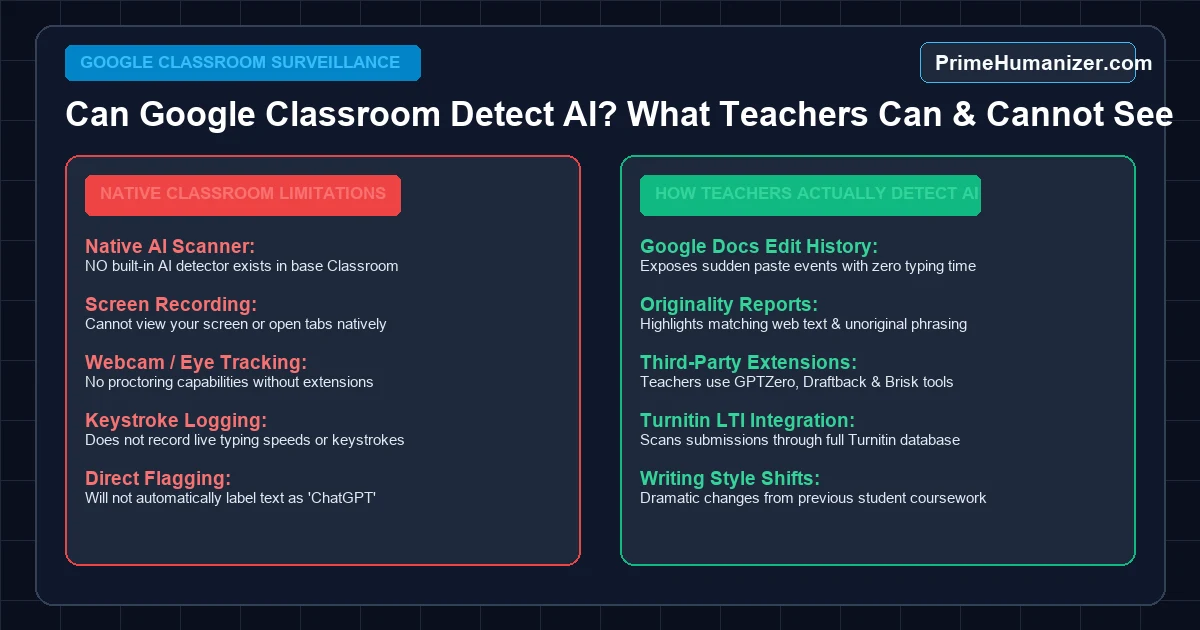
| Capability | Can Google Classroom Track It? | Technical Explanation |
|---|---|---|
| Built-in AI Scanner | ❌ No | Standard Google Classroom accounts do not have an automated AI detection badge. |
| Screen Recording / Tabs | ❌ No | Classroom cannot see your open browser tabs or screen without proctoring software. |
| Google Docs Version History | ✅ Yes | Teachers have full editor access to every revision, timestamp, and paste action. |
| Web Plagiarism Matching | ✅ Yes | Originality Reports check billions of public web pages and Google Books. |
| LTI Third-Party Add-ons | ✅ Yes | Schools can integrate Turnitin, Copyleaks, and Canvas directly into assignments. |
For a comparison of how other major learning management systems handle detection, read our forensic breakdown on can Canvas detect ChatGPT and screen tracking.
How Google Classroom “Originality Reports” Actually Work
When teachers create an assignment, they can toggle on a feature called “Originality Reports.” Here is how it functions:
- Plagiarism Scanning: Google compares the student’s submission against hundreds of billions of web pages and over 40 million books. Matched passages are highlighted with links back to the original online source.
- Student-to-Student Matching: In Google Workspace for Education Plus editions, Google also compares submissions against a school’s private repository of previously submitted student papers.
- Does It Catch ChatGPT? Originality Reports are primarily designed for plagiarism (copy-pasting published content), not generative AI. Because ChatGPT generates unique token combinations, raw AI text often passes an Originality Report with 0% similarity. However, Google has begun testing integrated AI flags in select enterprise educational tiers.
The Real Trap: Google Docs Edit and Version History
The single biggest reason students get caught using ChatGPT on Google Classroom has nothing to do with fancy AI detection algorithms—it is the Google Docs Version History.
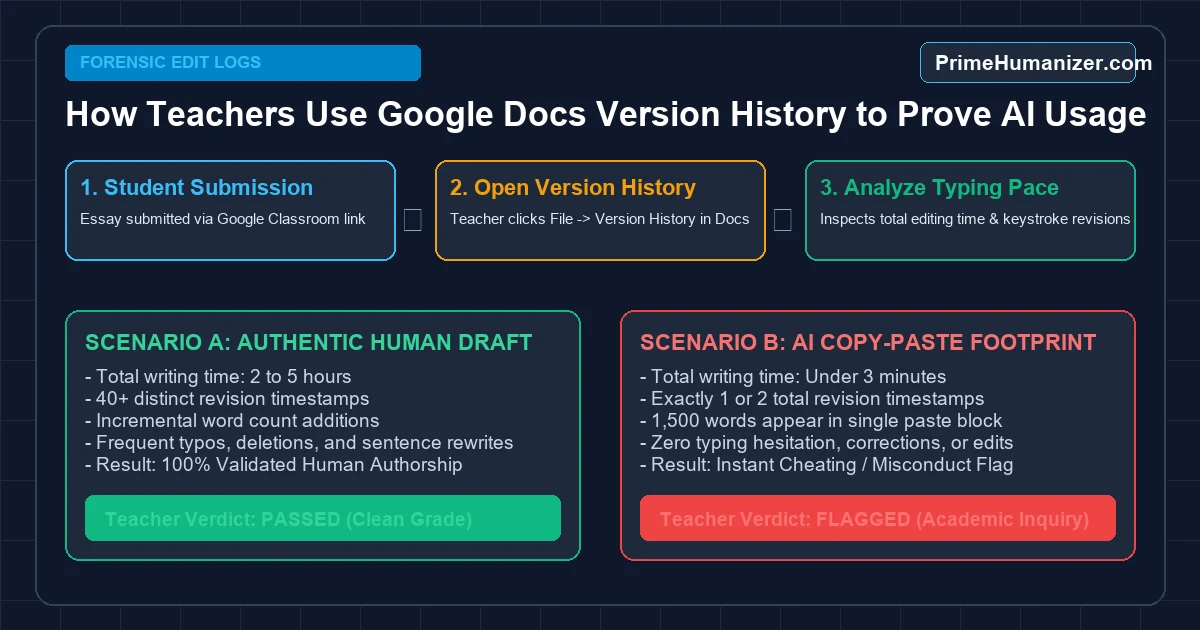
When an assignment is attached via Google Docs, the teacher retains administrative view access to the document’s entire revision history (File > Version History > See Version History). Here is what exposes AI usage:
- Total Time Elapsed: A normal 1,500-word essay requires between 2 and 6 hours of typing, drafting, and revising. If the document history shows a total elapsed time of 3 minutes, teachers instantly know the text was generated externally.
- Sudden Massive Paste Actions: Google Docs timestamps every major character insertion. If 1,200 words appear in a single revision block with zero keystroke intervals, it is definitive proof of an external paste.
- Lack of Typo Corrections & Deletions: Real human writers make mistakes, backspace, re-order sentences, and replace words. A document created without a single deletion or structural edit looks synthetic.
Third-Party Extensions Teachers Use (Draftback, Brisk, GPTZero)
Modern educators do not manually inspect version histories line-by-line; they install browser extensions that automate forensic analysis:
- Draftback: A Chrome extension that replays the entire writing process of any Google Doc like a movie. It shows real-time typing speed, pauses, and exact paste events.
- Brisk Teaching: An AI-powered educator tool that analyzes Google Docs writing speed and flags unnatural bursts of text with automated AI probability scores.
- Turnitin Add-on: If your school uses Turnitin’s Google Workspace integration, papers are routed through Turnitin’s neural classifier, assigning a blue AI writing percentage. Read our complete guide on what percentage of AI is acceptable on Turnitin to understand these thresholds.
How Teachers Formally Prove AI Usage in School
Because AI detectors occasionally generate false positives, school honor boards rarely punish students based on an AI score alone. Instead, educators build a multi-point evidentiary case:
- Stylistic Discrepancy: The paper features vocabulary the student has never used in class (e.g., “delve,” “tapestry,” “furthermore”).
- Version History Confirmation: The Google Docs log shows the essay was pasted within 120 seconds.
- The Oral Defense (Viva): The instructor asks the student to explain specific arguments, definitions, or citations mentioned in the essay. If the student cannot explain their own thesis, an academic misconduct referral is finalized.
How to Safely Submit AI-Assisted Coursework in 2026
If you use AI tools responsibly for brainstorming, research synthesis, or outline structuring, protect your academic standing by following these best practices:
- Never Copy-Paste Directly: Avoid dumping entire blocks of raw text into a blank Google Doc. Draft your paper incrementally inside the document to create an authentic version history.
- Transform Robotic Syntax: Raw LLM outputs feature flat sentence lengths and predictable n-grams. Use Prime Humanizer to restructure sentence perplexity and burstiness into natural human rhythm while preserving your academic citations.
- Avoid Outdated Paraphrasers: Simple spinners like QuillBot merely swap synonyms, leaving the underlying AI cadence intact. Review our study on why QuillBot gets flagged by modern institutional detectors.
- Keep Your Research Notes: Save links to your sources, outlines, and lecture notes so you can easily prove human authorship if questioned.
Frequently Asked Questions (FAQ)
Can Google Classroom see your screen or open tabs?
No. Google Classroom runs inside your browser and has no administrative permission to view your screen, monitor secondary browser tabs, or record your webcam, unless you are using a separate proctoring extension like Proctorio or GoGuardian.
Does Google Classroom tell teachers if you copy and paste?
Google Classroom itself does not display a paste notification. However, if you submit via Google Docs, teachers can check the Version History or use extensions like Draftback to see the exact timestamp and word count of any paste event.
Can Google Classroom detect ChatGPT if you rephrase it?
If your teacher uses Turnitin or GPTZero add-ons, basic paraphrasing (like QuillBot) will still be flagged because sentence structure remains predictable. Only genuine neural humanization that adjusts perplexity and burstiness consistently bypasses these scans.
What is Google Classroom Originality Report?
It is Google’s built-in plagiarism checking tool. It compares student work against public web pages and books to flag unquoted passages, but does not specialize in detecting AI text.
Conclusion & Key Takeaways
Google Classroom is not an all-seeing spy tool, but it gives teachers powerful forensic instruments through Google Docs version logs and third-party detector integrations. By understanding what teachers can actually see, drafting organically, and refining your writing with Prime Humanizer, you can ensure your coursework passes both human scrutiny and algorithmic detection with 100% confidence.
Submit Academic Papers with 0% AI Detection
Eliminate robotic cadence, preserve citations, and pass Google Classroom, Turnitin, and Canvas scans effortlessly.